
"MP4Box is a multimedia packager, with a vast number of functionalities: conversion, splitting, hinting, dumping and others. It can be used for performing many manipulations on multimedia files like AVI, MPG, TS, but mostly on ISO media files (e.g. MP4, 3GP). It is a command-line tool so it can be utilized by scripts like the PHP script that I want to use. MP4Box is included in the GPAC package."
I want to be able to use a certain media hosting package, but during installation it tells me that it will require MP4Box to continue. I tried installing it regularly (apt-get install mp4box) but that didn't work. After doing a bit of research I decided to build MP4Box from scratch, so that means compiling the source and here's how I did that.
Let's start by installing the required software that allows you to use svn:
apt-get install -y subversion
This command will download the latest gpac version from the svn subversion in the current location. (use "pwd" to see your current location)
svn co https://svn.code.sf.net/p/gpac/code/trunk/gpac gpac
We need to change the "configure" file rights so we can execute the file.
cd gpacchmod +x configure
I used the command below to configure the source package, but this is just one way of doing it. Simply using "./configure" could be sufficient for you. If you require other functionality, you might want to investigate further to learn what your options are by using the command "./configure --help"
./configure --disable-opengl --use-js=no --use-ft=no --use-jpeg=no --use-png=no --use-faad=no --use-mad=no --use-xvid=no --use-ffmpeg=no --use-ogg=no --use-vorbis=no --use-theora=no --use-openjpeg=no
The next step is to build and install the package.
makemake install
Don't forget to copy the following file to you /usr/bin folder.
cp bin/gcc/libgpac.so /usr/lib
To check if it was installed at the right location, use the command "which MP4Box", and it should tell you that it was found in /usr/local/bin.

"MP4Box -version" it will show you something similar as shown in the image below.
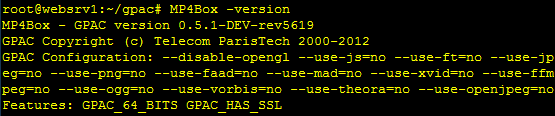
And you are done already!! Easy-peasy lemon-squeezy right? As we say in the Netherlands: "A child can do the laundry." But that's a saying that, like most sayings, does not translate well, or make any sense whatsoever in English. 🙂









🙂
You can also follow this tutorial: http://gpac.io/2015/07/29/gpac-build-mp4box-only-all-platforms/
🙂
You can also follow this tutorial: https://gpac.io/2015/07/29/gpac-build-mp4box-only-all-platforms/