Update 30-7-2023 - This post is a bit old. I have written a new article on the subject. Check it out here: https://www.ustoopia.nl/featured/block-countries-based-on-geo-data-with-ufw-firewall/
I was noticing some really strange requests in my web server's log files on a VPS that I manage. Requests that seem to be focused on finding vulnerabilities or exploits. Turns out, most of the originating IP addresses are from China. Since the VPS is not behind a router or otherwise managed firewall device, I decided to investigate if I could just block all traffic from China to my VPS. Turns out the software "Uncomplicated Firewall" or better known as UFW, that I already had running can do this easily. If you're new to UFW, take a look at this very comprehensive page showing how to set it up.
Here are two examples showing how to set up your UFW firewall to block IP addresses or ports based on Geo location. This should work on any system running UFW, but in this case I did it on a headless Ubuntu 18.04 system. Click on Read more to view the rest of this article.
First, you will need to look up the country you want to block at the bottom of this page: https://www.ip2location.com/free/visitor-blocker. Choose CIDR format before clicking the download button. In this example, I picked China.
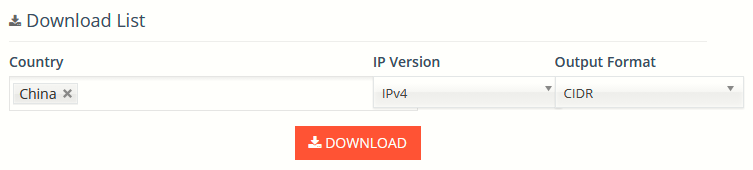
Save the text file to any location on your server using an identifying name like "cidr-china.txt". Open the location where you downloaded the text file in your terminal and enter the command below. Be aware that it will probably take a while to complete! In my case, on a fast VPS, it still took at least ten minutes.
cat cidr-china.txt | awk '/^[^#]/ { print $1 }' | sudo xargs -I {} ufw deny from {} to any
This will take several minutes, so be patient. The command will ignore all the lines in the text file that start with # and uses the all the subnet info to set up blocking rules in your UFW configuration. Please keep the cidr-china.txt because you might need it at some point whenever you decide to remove the blocking rules. This can be done with this command:
cat cidr-china.txt | awk '/^[^#]/ { print $1 }' | sudo xargs -I {} ufw delete deny from {}
You should also perform this command when you decide to 'update' the list at some point in the future. So remove everything before importing a new list!
There are many more ways to feed the information in the text file to UFW. Here's another example where I block all traffic to port 22 originating from China, and allowing all other regular traffic.
cat cidr-china.txt | grep -v ^# | while read subnet; do sudo ufw deny proto tcp from $subnet to any port 22; done
The command to undo all the lines that the previous command added:
cat cidr-china.txt | grep -v ^# | while read subnet; do sudo ufw delete deny proto tcp from $subnet to any port 22; done
Make sure to check the firewall config when you're done using ufw status.
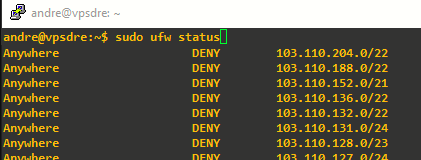









Hi, it is a really nice way, I imagine that if you do an uwf status it list all this ip's? do you find another way to geo block all this ip's? does it affect the performance of the server?
thanks a lot !
THis is excatly what I was looking for. In your article you mentioned that it would take about 10 mins to complete. I have 7276 records and so far it's taken over 1.5 hours. Should I stop it or let it continue?
Thanks
Just let it run. But I'm curious why you followed the old tutorial. At the top of the page is clearly stated that a newer updated version can be found here: https://www.ustoopia.nl/technical/tips-and-tricks/block-countries-based-on-geo-data-with-ufw-firewall/
I missed that part. Besides, I think the first one has MORE info like the port 22 stuff as I'm very new to Linux. Great job tho.
Sorry this is a P.S. This is to show you how NEW I am to this stuff. I just started a website (currently down), and I've noticed alot of traffic in my access.log. So I installed UFW and Fail2ban and to my eyes, I'm still getting alot. Then I noticed your post (old post) and I said "wow", I have access to the world to ban. Actually, I would love to ban all IP address looking at my site, except those people (IP Address) that currently live in a 50 mile distances from my house. The post that I used was very simple and not confusing at all. Which leave me to ask this one question. Sometimes I see a log entry in my access log from an IP address of 192.30.3404.293. This is NOT a normal IP address because I can't ban it using UFW or Fail2ban. By any chance do you know what type of IP address this is?
Thanks
Dan
The address you mention can by definition not be a valid IP address. 192.30.3404.293 where 3404 simply isn't possible due to how the technology behind it all works. I'm guessing you made a typo error??
My first guess would be that this is part of a local area network range because it begins with 192. Not sure about that though. I've never heard of 192.30. Until just now. If you tell me that correct address, then we can do a bit more investigating.
Really that is the ip address that I found in my access log. Of course I made it up (the ip address part), but the part that has 4 numbers in it, isn't made up. I have seen in the past year a large numbere of ip address that has 4 numbers in it. Sorry if I mislead you on that one.
Since I have you on the message, may I ask another question if you don't mind. Today I merge 4 countries of ip's address together. Wow 345,392 of them. Tonight as I was getting tried of watching Rules Added, I decided to stop it. Even tho it was saved, but that took 6 hours and according to everything I have to do the 345,392 ip address would of taken at least a week to do. So I decided to try the "https://blog.ip2location.com/knowledge-base/how-to-block-ip-addresses-from-a-country-using-ipset/" the ipset route instead. That was much, much quicker. However, I came to a road block that maybe you can help me out with. If you go to the direction page the road block happen on Step #10. I figured out how to ipset save > /etc/countryblocker.ipset. That worked. But the following line #2. iptables-save > /etc/iptables/rules.iptables didn't work. Everytime I ran it I got the error bash: /etc/iptables/rules.iptables: No such file or directory. What gives, and how do I correct it. Last question. So if I decided to go with this "ipset" thing, how am i support to add more?
Thanks a millions on this one.
Dan
The four numbers was not a typo? Well then I think you are looking at an ipv6 address. A screenshot would perhaps explain things better.
What you can try is do: sudo mkdir /etc/iptables/ and then try again to write the file /etc/iptables/rules.iptables
Maybe the github page here https://github.com/poddmo/ufw-blocklist can be helpful to you. The developer created that repository to make the process even easier.
As soon as I find that ip address, I'll send you (don't know how) a picture of it. I come to find out that iptables is depreciated, and being replaced with nftables. If that's the case, what's going to be ufw frontend? Iptables still or move over to nftables? I love the ideal of forming a text list and having it stored that way instead of watching "Rule Added" for about 6 hours. No thank you, however, I did noticed something today while I was doing it. I had HTOP running in the back ground. I noticed that the program would pick up the IP address for ufw, deposit it into the folder of iptables, and then reload ufw again. That is why it's taking so long. Yes, I'm still confused about which way to go with this, as I would hate for a year to go by, and then they kill iptables. But I don't see that happing because ufw uses iptables. Your thoughts about this?
I'm so sorry that I'm just now noticing this comment because of a different comments somebody posted here.
It does indeed list all the IP's when you do ufw status. That is actually for me personally, one of the downsides of using this technique. It does not however noticeably impact the performance of the server. A different way to geo block is by using Cloudflared. A free account will be sufficient for this. Cloudflared allows you to create rule sets. Simply create an awf rule that does something like: if request comes from such and such country, block it.
Also, the newer, updated post on this subject contains a link to a github page that greatly simplifies doing this. At the bottom of this page: https://www.ustoopia.nl/technical/tips-and-tricks/block-countries-based-on-geo-data-with-ufw-firewall/
Alberto - using the information on this page, as I like the way I can do it, if I wanted to add another set of ip's to ban, how would I go about doing it without deleing the set from China that I already have? Again, I'm new to this stuff and I want to make sure before I see another 2.5 hours go down the drain. I'm doing this on a raspberry pi verison 4. Loading in the China file, it did in fact take about 2.5 hours before I could check it out. After that my webserver seems to be find as far as performanace goes I didn't see any slow downs at all.
I'm not entirely sure what you are asking exactly. But let me say that you can add as many sets if IP's to ban after having imported China. It shouldn't impact any of the things you imported before. China is the biggest one and therefore takes the longest to complete. I can imagine that a raspberry pi will take its time for these actions. Any other country you decide to add won't take as long as it did for China. Not sure if I answered your question with this. Let me know plz.
I have that file. Attached is the file I hope you can give me some answers because everyone I've asked doesn't have a clue. https://uploads.disquscdn.com/images/33af7ba7bca6843f9e43402a54cdc26de6f8ecc5e4c78d7dde07d0759a72d0cd.png
That's a mysterious list of numbers. I have never before saw such numbers in any webserver log files. This is a complete mystery to me what these are. Very strange..
I lost your email that you just reply to me about the image that I sent you. Like I was saying, both UFW and Fail2ban goes crazy when I try and ban those ip address with the 4 digits in them. Speaking of IP address. I sent you another email today about another problem, but in the same cat. I found another source of ip address that I would like to use https://github.com/stamparm/ipsum. Problem with using his method is that for some odd reason UFW will disappear from me. His files don't have the CIDR format. How can I use your write method on his files and load them in?
That's not very surprising to me that both UFW and fail2ban are having issues because the ones with 4 numbers are in fact not ip4 IP addresses. I have no idea what they actually are. WHen I do a whois on one of those addresses it doesn't understand the address either.
Thank you :).