
The ultimate "lazy" way to host your own private WotLK World of Warcraft server with PlayerBots.
DrePack is a fully portable AzerothCore environment, with a bunch of mods, featuring a minimal built-in management menu, and a simple account-registration page.

In case you're running in to an error, a solution or workaround might be to manually create this folder: C:\Games\DrePack. Many thanks to Ricky, for informing me about this issue, and also for telling me how he resolved it. I'm not 100% sure what caused it, but apparently creating the folder fixes it.
More people have been reporting problems getting the repack to run. All of these issues have been entirely my bad, sorry, but hey, I believe I deserve some slack, since it's my very first repack, ever. You'll forgive me my rookie mistakes. I'll admit that I should've probably tested the repack a bit better before releasing it. I thought it was flawless after a quick test-run, making me feel a bit over-confident perhaps, but I've learned my lesson. Let's just say, there is room for improvement :-). I learned a lot these last two weeks, through you guys, so that's nice. I've also been taking a good look at other, older repacks, to learn how those were put together, and this gave me some insights, and several ideas for DrePack version 2. I know now that I can do a LOT better, and version 2 is underway. A quick thanks to all who contacted me and tell me their experiences, this has been very useful feedback, and thanks for your patience. Luckily, all issues could eventually be resolved, and I was pleased to hear you guys tell me that you're now all having tons of fun with the playerbots.
A "repack" is basically a ready-to-use package of the server software, in this case AzerothCore. Think of it like a starter kit that saves you from having to compile all the server files yourself from the source code. Basically, it allows you to download the files, unzip everything, run one or two files, and that's all you need to start playing.
_START_SERVER.bat inside the DrePack folder.SET realmlist 127.0.0.1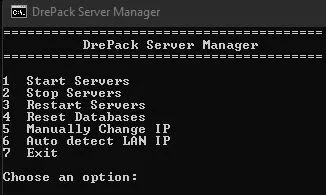
Skeptical about running a .bat file? No problem, I get that! Go ahead and open it with Notepad to check it out for yourself. Or paste the code into ChatGPT and have it explain to you what it does exactly. It will tell you that all it does is automate the tedious stuff, like:
DrePack comes preloaded with numerous modules. Playerbots, AHBot and Transmog have been enabled, but nearly all other mods are disabled, to save resources, but also because several mods will change the server drastically, so you should first decide if you want that or not. Enabling the modules is easily done.
configs\modules\module-name.conf.Module.Name.Enable=0 to 1.ollama pull llama3.2:1b from a command prompt first.http://localhost.http://localhost/phpMyAdmin.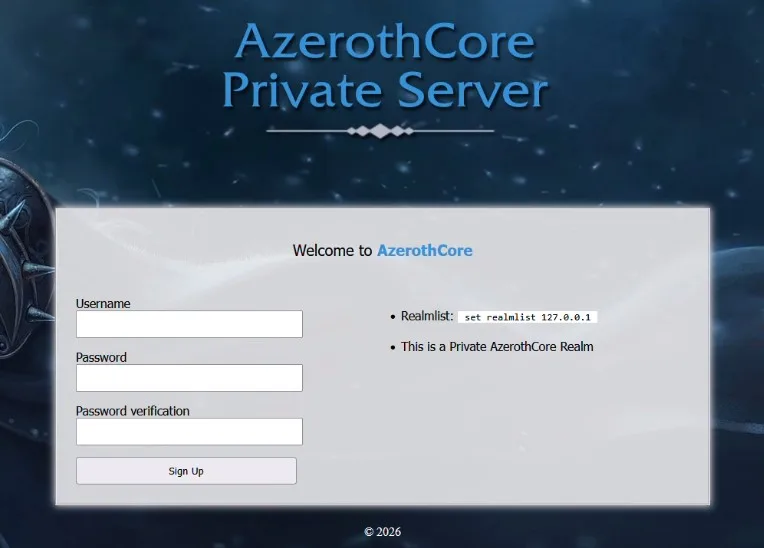
http://localhost to create regular accounts.account create accountname passwordaccount set gmlevel accountname 3 -1_START_SERVER.bat menu.config\worldserver.conf. If you break it, delete it and copy worldserver.conf.dist to reset.Several modules require an in-game NPC to interact with. You'll need to spawn them.
Enable the module first, then use .npc add [ID] in-game.
| Module | Spawn Command |
|---|---|
| Assistant | .npc add 9000000 |
| Transmog | .npc add 190010 |
| Beastmaster | .npc add 601026 |
| Services | .npc add 55002 |
| Dungeonmaster | .npc add 197762 |
| Buffer | .npc add 601016 |
| Enchanter | .npc add 601015 |
| Spectator | .npc add 190000 |
| GuildHouse | .npc add 500030 |
| Queue List | .npc add 93080 |
| Top Arena | .npc add 55333 |
| 1v1 Arena | .npc add 999991 |
| Reward Shop | .npc add 92000 |
| Mythic Plus | .npc add 200005 |
| Gambler | .npc add 601020 |
| Tic-Tac-Toe | |
Complete list of all the modules that are included in the repack.
DrePack was compiled on Monday the 22nd of March 2026. ⚔️
After many, many requests, or at least, that one person, I have packaged an all-in-one repack for AzerothCore on Windows. It includes a couple of really cool mods, like PlayerBots, AHBot, Transmog, OllamaChat, GuildHouse, and many more. Because why? Because I aim to please.
I compiled the server on Tuesday the 22nd of March 2026. It took me quite some time to package everything together in a way that it would become fully portable. It wasn't as easy as I thought beforehand. Especially because I wanted to include a simple webpage that allows people to register an account for the server. I borrowed a thing or two from XAMPP, and I downloaded a random repack to learn from how they packaged everything. Being the perfectionist that I can be sometimes, I believe I did a much better job.
Since everybody who wants to use this repack will choose a different folder location, my priority was to make sure that everything would work fine, wherever the files are stored. Wanting to include Apache and PHP didn't make things easy for myself, since they use some config files that contain absolute paths. Simply changing these to relative paths didn't work out the way I had hoped. So, I decided to create a .bat file, that will copy all the required config files from a template file, and at the same time it will change each line where an absolute path is used, so it will work from the folder where you will run it from.
In order to keep the file size of the repack as small as possible, I've chosen not to include the game-data files. Since those are hosted on GitHub, the bat file will download it from there and unzip it when you run it for the first time. This trimmed down the size of the repack with another 1.1GB. Resulting in a zip file that has an acceptable file size of 570MB in total.
I've tested the repack myself, twice, and everything was working as intended. It should, in theory, work for anybody on Windows, but, I can imagine that a some people will experience errors, or issues, due to things that I didn't think of. If this is the case for you, let me know in the comments. I wrote detailed instructions in the README.md. As long as you don't already have MySQL running, or anything that runs on port 80, you should be good. In theory… Feedback is always welcome. So, I guess I'm looking for a couple of people who are willing to test it out! Are you up for that?
[epkb-faqs group_ids="265" title_alignment="center" number_of_columns="1" icon_type="icon_plus" icon_location="right" border_mode="all_around" compact_mode="compact_medium" open_mode="toggle_mode" question_background_color="#34495e" answer_background_color="#ecf0f1" question_text_color="#c778dd" answer_text_color="#2c3e50" icon_color="#ffffff" border_color="#2c3e50" title="Frequently Asked Questions"]








Hi, I was the one who requested or least one of them who did to download the repack. I currently have one with a lot of modules that make solo playing Wrath totally doable. But it was missing the player bots which the guy in our forum didn't want to add as at that time it was very insecure and people were using the mine crypto on people's pc's. Anyway this looks great and I did try to run it. One of the windows disappeared quickly but I let it continue to run. The window to create account wouldn't let me click on it and appeared stuck? Maybe hadn't completed downloading database? I also couldn't load localhost page for account creation. You think maybe it just wasn't done unzipping? Also I know the .bat is safe according Chatgpt but is the entire thing safe , no backdoors, keyloggers? Sorry to ask just being safe. It's a great thing for us that can't do this and just want to be sure. No offense of course. If it works like I'm hoping I'd be glad to send a few bucks on paypal later to show gratitude. Any advice on the above though is greatly appreciated.
First, let me compliment you for how cautious you are. You should be, nowadays. Since I'm the one who put the whole package together, I know there's nothing malicious in there. But I'm aware that me saying that, may not be very convincing, because if I would've packed it with malware, I would of course not be admitting that here, certainly not on the page where you downloaded it from. All I can say is, I don't hide who I am, and I'm hosting it from my personal website. Links can be found to my social media, and getting in contact with me is, as you can see, really easy. This hopefully shows that I have nothing to hide. For what it's worth, I promise you, the repack is 100% safe, and only contains stuff that allows you to run a server, the easiest way possible. My intention is to release a better repack in the near future, because I know I can do a lot better. More on that later.
Your story made me realize that the next time, I should try to find some way that proves to others that the repack is 100% safe, and put together by a huge WoW fan, instead of a person with bad intentions. And a hobbyist, since I enjoy just meddling around with stuff like this. And from this meddling I learn all the ins-and-outs, and at that point, I just like to share it, hoping it will bring others joy as it does me. That's the honest story behind it. But hey, I totally get your concerns, especially when know that repacks have indeed been used to spread malware by people who used it to do bad things. Fuck those guys! Probably Russians.
On a server I manage, I blocked the entirety of Russia from accessing its services, and since then, the firewall logs, and the log files that keep track of attacks have reduced in size at least 75%. That really says something. Anyways..
You told me that the repack basically didn't work for you. That's a shame and I would love to hear what exactly went wrong, so I can fix it. First though, I have a question. Are you same person who I told about the repack in the YouTube comments on an earlier video of mine? Because if that is the case, then you're issues may be solved by simply re-downloading the zip again. Cause here's the thing: When I left that comment for you, I tested the repack myself for a third time. And I found an issue, which I solved, and created a new zip file that I uploaded the day after. If you have no clue what I'm talking about, then let me ask you this question: when exactly did you download the zip? The zip that had errors was online for almost 24 hours. Also, if it turns out that you downloaded the correct zip file, and it still doesn't work, then I would be interested to learn where it went wrong exactly. You can help me with that, by checking to see if any log files appeared in the log folders, and telling me what is in them.
Thank you so much for replying to my comment. And not being offended for me being cautious. I too am a huge Wow fan or at least was. I played since Vanilla and finally stopped after 17 years. The game began to be too serious and too sweaty. Raids were a pain instead of fun like in Vanilla and BC. Hence wanting a repack. To play through the three favorites of most players. I actually like Pandaria too myself. Coming from a martial arts background.
I did reload the reload the repack and noticed you had changed playerbots update to keep it from crashing. I've not try to run it yet. But on the first one, what did happen is. I clicked .bat file and watched two windows load, third one loaded then seemed to crash. The one window where you create an account seemed to stall. The cursor was just flashing but the page was doing nothing and I couldn't click on it. So I think maybe it was still downloading the database? Or expanding it? I didn't wait that long to see. I did miss the part in video on how to create account and was trying to log in to accounts using your passwords. I see now they were for the server or Myqsl? But I did see a realm with 9 chars there. But it would not let me click it to join or create character. I think the entire thing was my fault, not your repack. I should have finished watching the video. Again I did redownload the repack after you said you fixed it. I'm just being cautious and anyone should. Never know these LOL. I can see why you'd do this. As a wow fan and just wanting to share something you're good at doing. To let others who liked Wow to play with bots that is tough for some of us to build. Anyways thank you for sharing and not being offended by my questions. I'll try to run the new one soon. And look forward to seeing what you create on the next one. One thing the creator of the old azerothcore I have did was allow creativity. We were allowed to change the music of each city to whatever we wanted. The login screen could also be changed. There was also various patches we had that changed the looks of mounts, armor, etc. He also imported Cataclysm water, trees, and bodies into the core. I found and downloaded a patch that gave the game "darker night" so at night it was more realistic making each city so pretty at night.Just some ideas you might can use to create your next repack. Thanks again will let you know if I get it to run.
I redownloaded the files. I clicked on the start.bat file again. Two windows appeared and a third appeared then crashed. I let everything run as long as possible. It appears it's looking for c:/games which doesn't exist. I restarted the bat file again and the authorserv started again.This time with a continued error not being able to connect to server. It finally aborted. On one screen that did stay open title was blank and showed this on the screen.
mysqld: Can't open shared library 'C:\Games\DrePack\mysql\lib\plugin\component_reference_cache.dll' (errno: 126 The specified module could not be found.)
mysqld: Cannot load component from specified URN: 'file://component_reference_cache'.
2026-04-04T01:00:22.561214Z 0 [System] [MY-010116] [Server] D:\DrePack\DrePack\mysql\bin\mysqld.exe (mysqld 8.0.45) starting as process 1640
2026-04-04T01:00:22.561294Z 0 [ERROR] [MY-010338] [Server] Can't find error-message file 'C:\Games\DrePack\mysql\share\errmsg.sys'. Check error-message file location and 'lc-messages-dir' configuration directive.
2026-04-04T01:00:22.605086Z 1 [System] [MY-013576] [InnoDB] InnoDB initialization has started.
2026-04-04T01:03:06.553319Z 1 [System] [MY-013577] [InnoDB] InnoDB initialization has ended.
2026-04-04T01:03:30.491065Z 0 [Warning] [MY-013829] [Server] Missing data directory for ICU regular expressions: C:\Games\DrePack\mysql\lib\private.
2026-04-04T01:03:30.565077Z 0 [Warning] [MY-010068] [Server] CA certificate ca.pem is self signed.
2026-04-04T01:03:30.565150Z 0 [System] [MY-013602] [Server] Channel mysql_main configured to support TLS. Encrypted connections are now supported for this channel.
2026-04-04T01:04:12.991628Z 0 [System] [MY-011323] [Server] X Plugin ready for connections. Bind-address: '::' port: 33060
2026-04-04T01:04:12.991804Z 0 [System] [MY-010931] [Server] D:\DrePack\DrePack\mysql\bin\mysqld.exe: ready for connections. Version: '8.0.45' socket: '' port: 3306 MySQL Community Server - GPL.
After this I did try to click on the Authserv page to create account and it will not let you add any text. And the http://localhost will not open. There are no entries in logs folders.
Sorry for the extra comment. I did find two files in the crash folder. They are long so didn't want paste them here. I did read in one of them and error connecting to sql server. One window that stayed open did say error finding data.zip file then said success downloading data. But the one window is still crashing. I did also create C:/games/ and unzipped the files to that folder. Same results.
It's a little late now but if you look inside the batch file (Start Server) it points to:
https://github.com/wowgaming/client-data/releases/download/v19/Data.zip
Downloading that manually and putting it in the Root Folder\data folder fixes it.
You'll still get the error message as it can't download it, but it then progresses on to unarchive it. It's weird that it doesn't check for this file first because it will keep trying to download it forever.
Ok, hmm, that's not good. I'm going to try and see if I can replicate this error. I have some questions first though..
- In what folder and which drive did you store the files from the zip?
-Did you by any chance already have a previous installation of MySQL on your computer? That was installed the regular installer way? Also, if it's not too much trouble, can you send me those other, long errors also? You can mail that to ustoopia@gmail.com.
-Can you start the authserver.exe and worldserver.exe from the command line? So do not run them by double-clicking, or from the menu. But open a command prompt window, go to the folder where the exe's are located, and from there, type: worldserver.exe. When you run it this way, the window will not automatically close, but stay open, and, more importantly, show an error message. This message will be interesting to me.
The first time I tried to run the program I ran it from unzipped folder on my D: drive. I saw the errors looking for C:/games/drepack so I created that folder and unzipped there. Same errors. I did notice last time it seemed to be looking for your ip address that I saw in your video. My client is set for local home ip though. I deleted the folder after several attempts but will run the .bat file again and get the files. I'll also try what you said and run from CMD and send you what it says. Thanks for the help. I'll email you something soon.
Oh and as far as having an installation of Mysql installed earlier, there was none at first. But after the errors I got trying to start the repack I decided to create my own using Chatgpt which was a disaster. There might be reminents of the Mysql still on the pc. I did a system restore and it seemed to remove all the programs I had installed.
I emailed you some error messages you requested. Did you figure anything out? I've tried over and over and it will not work. My question is if it's portable why does it keep trying to look in C:/games/Drepack? Shouldn't it run no matter where it is? Hoping you found something, I'd really like to get it working.
Hi Andre. I finally got it the repack to work. With a little help from Chatgpt. I was wondering though can You change the server status from PVP to regular? Also the chat window does have some errors while trying to chat. Lua errors? I tried to chatting with a bot and it doesn't respond. It did join my party. Last question why is there level 60's in starting areas for gnomes? Is that a settings in the bot file?
Sorry all the comments. I did fix the chat problem it was an addon. So far your repack is running great and is awesome! Last problem I did create a gm account in server like in your video but cannot get commands to work in the game. Any ideas?
Hello. Thanks for your work! Installed repack and everything seems to work fine. Wanted to enable individual progression, but looks like it's not included?
Thanks- I got it to work and started playing!
I noticed that all my loots are automatically sold. Maybe due to junk to gold mod. How do I disable that?
I got it working! Thanks for the pack and notes. I did have to uninstall SQL I already had as that was causing an issue but after a fresh download it worked. I look forward to your next one, if i can make a request. Adding any module that adds content and figuring out ollama lol. So i got to a point where once it tried to reply to me it crashed my world server.
I tried everything I could think of and got Gemini to give it a go but not dice. figured I'd post what it told me to "In revision f42434df1cd5, mod_ollama_chat causes an immediate C0000005 ACCESS_VIOLATION crash when a player uses /say near a bot. The crash happens during the outbound request phase (Ollama receives no ping)."
Thanks again!
@Tristan, I noticed my loot being sold automatically too. But it's just junk loot such as bone, or leather scraps, etc. Stuff you can't really use or wouldn't get anything for on AH. Saves time actually having to go sell it to a vendor in town.
Thanks for the repack. I've been playing it for a few days now. One thing that I haven't got working is the restart servers option in the start server batch file. It closes the current ones but doesn't restart them. Also, the guildmaster npc didn't spawn with the code when I tried it.
Hi Andre,
I've been looking for a nice repack, but I'm more interested in TBC rather than WoTLK.
Is there a way to lock the content only to TBC?
I've scoured google and apparently there is a way, to lock do class and some more stuff. But i'm interested if there's an easier way 🙂.
@HarveyUK Mine didn't spawn at first either. I contacted Andre and he sent me the missing GM vendor files. Apparently they were missing. After I installed them it worked fine. I think you can contact him at the address at bottom of page. It's a great repack. Working great so far.
Thanks! I am having a great time with the server. I have a family of 4 and we have all played and it has been great! The only thing I haven't been able to figure out is how to turn off the popup for 'Mystery Token' that I don't get every 10 levels. But that is such a minor thing I don't even care. I have been through every starting area and every class testing and everything seems to work so far. I went through a few dungeons and even Warsong Gulch and they have worked so far.
I would just recccomend people get the Playerbot Manager addon if they intend to use bots in the dungeons https://github.com/Lichborne-AC/PlayerbotManager That and checking out their wiki https://github.com/mod-playerbots/mod-playerbots/wiki/Playerbot-Addons-and-Sub%E2%80%90Modules make things way easier to figure out.
Thanks again for this repack. I have been having issues with getting the npc to spawn from the modules. I did give myself GM privileges in the world server, and still can't spawn them, It says "npc add [ID] does not exist"
Just in case I am not the only noob trying to do this. Following the instructions I was unable to get it working. But after reading the UPDATE FIX...I tried creating a folder called Games on the root of my C: drive. I extracted the DrePack zip to it, waited for it to do it thangs, ran the batch file _start_server and everything worked! I did get some red text in the world server window (something about playerbots). But logging in after creating an accout on the web login page; everything is working! Thank you for this!
hey man thanks for the work, I cant find anywhere mod-individual-progression and also i cant spawn GuildHouse .npc add 500030 for any reason, am i missing something. Everything else works perfect
This a great repack! Thank you. For those having problems please read the instructions.After chatting with Andre and fixing a couple of problems on my end the repack runs great. I've ran my first battleground "Warsong Gulch" and the bots ran fairly well. Waiting for Arathi Basin to see more. The first dungeon will be the real test. I'd suggest downloading the addon called Unbot. It lets you control your party bots and doesn't take up much space on screen at all. I've ran countless virus scans and even showed some files to Chatgpt. All seems to be clean and legit. Thanks to Andre for this great repack. It does work fine and the bots make it seem almost live!
Hi, im having issues with MYSQL , seems i cannot start it , it says it can't create test file's or set datadir , ive removed mysql completely before not sure how to fix this right now. any tips?
@ML Please create the folder C:/games then extract the repack to that folder. Giving you C:games/drepack. Inside Drepack folder click the start.bat file. It will now have correct address to install and extract. If you have an error with dirdata like I did, just download it from github and extract to where it says too. That should take care of your problems.
Individual Progression is not included in the repack
Just installed and it worked 100% no errors awesome work so far not run the server yet with client just going to check the conf files and tweak it some 🙂
Big thumbs up from me 🙂
Will reply when i have logged in and messed around some more 🙂
OK update all works good server did crash when i made a char and tried to login
Tried again and been running fine
Quick question i have used other repacks with npc bots players bot etc i can run like 4000 5000
here i am starting with 700 and boy does it take ages to have them login
normally i can do 4000 in like 5 mins or less it took about 20 mins to loadin 700
mod-junk-to-gold has no conf file to make it disable. I tried everything to disable it but i think it's just hardcoded in build. Could you rebuild so we can disable it by just using notepad ? It's very annoying if i want a fresh level 1 and i can't even wear any armor because game auto sells it when i loot it and kills immersion for me.
Hey,
Is it possible to remove all the modules, except Playerbot & Ah Bot?
And add: individual-progression?
🙂
Can I transfer my data from.the repack to the potential version 2?
can you make junk to gold module editable?
Hello, thank you for putting this together. I've been having fun learning to host my own server.
I did have to create my own :"C:\Games\DrePack" folder to get everything running. I'm also parroting what many people above have stated and dislike the auto sell grey item feature and would like a way to disable it, any help would be appreciated